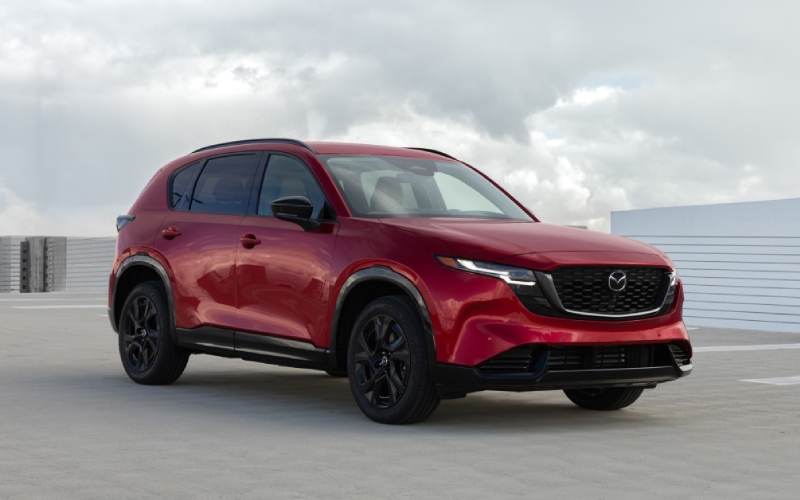
Huntington Beach Mazda - Will Google built-in on the 2026 Mazda CX-5 work without my phone near Costa Mesa, CA?
The quick way to think about it is this - with the 2026 Mazda CX-5, Google built-in is part of the vehicle itself. That means core features like Google Maps, the Google Play Store, and voice assistance are designed to run natively on the CX-5’s available 15.6-inch integrated touchscreen, even if your smartphone stays in your bag. For drivers around Costa Mesa, CA - from navigating South Coast Plaza garages to timing a smooth merge onto the 405 or 55 - this is a real convenience upgrade that feels seamless from day one.
At Huntington Beach Mazda, we help new CX-5 owners set up Google built-in so it feels familiar right away. Because it’s baked into the SUV’s infotainment, you do not need to plug in a phone to launch navigation, ask for directions, search for a coffee spot near The CAMP or The LAB Anti-Mall, or install compatible in-vehicle apps. You will want an internet connection for live traffic, app downloads, and updates, and signing in to your Google Account unlocks more personalization - but the experience is designed to work from the dash, not your device.
What “built-in” really means for daily driving in Costa Mesa
Unlike a phone-mirroring setup, Google built-in operates on the 2026 Mazda CX-5’s system. The available 15.6-inch display is Mazda’s largest ever, with a clean, smartphone-like interface and a customizable home screen. That layout is ideal for quick taps when you are pulling out of a driveway in Eastside Costa Mesa or selecting a route to the OC Fair & Event Center. Because the apps are integrated, you can speak naturally to the assistant, get directions, and follow turn-by-turn guidance without touching your phone.
When you are signed in, Google Maps pulls in your saved places and recent searches - so if you marked your favorite spot near Fairview Park or a preferred entrance to Segerstrom Center for the Arts, those shortcuts show up in the car. Live traffic can help you pick between the 73, the 405, or surface streets like Harbor Boulevard, based on what is moving now instead of what moved an hour ago.
So, can you leave your phone at home?
Yes - for most everyday tasks in the 2026 Mazda CX-5, you can. Because the navigation and voice assistance are built into the vehicle, you do not need to connect a smartphone to start using them. An internet connection is recommended for the best experience, and many owners choose to sign in with a Google Account to sync favorites. If you prefer not to sign in, you can still access core mapping and compatible apps on the in-vehicle system when connected.
This feels especially handy for short trips around Costa Mesa: a quick run to Trader Joe’s off 17th Street, pickup at Orange Coast College, or meeting friends at South Coast Plaza. Start the CX-5, say where you are headed, and go - even if your phone battery is low or you left it charging at home.
What works without your phone - and when a phone still helps
Here is a simple way to break it down, based on real-life use in and around Costa Mesa. The first list covers what runs right from the CX-5’s system. The second list covers when your phone can still come in handy.
- Built-in navigation: Google Maps operates on the vehicle’s system and can provide turn-by-turn guidance and fresh traffic information when connected.
- Voice assistance: You can speak naturally to control navigation and search for places - with follow-up questions to refine results.
- App access: The Google Play Store offers a curated selection of in-vehicle compatible apps to personalize your drive.
- Future enhancements: As features evolve, Mazda can add branded and third-party capabilities via future updates.
There are also times your phone adds convenience, especially for connectivity or personal media accounts you already use daily.
- Internet connection: If the vehicle is not connected, your phone’s hotspot can provide data for live traffic, app downloads, and updates.
- Account sign-in: Signing in with your Google Account helps pull in saved places and preferences you have built on your device over time.
- Personal subscriptions: If you use specific streaming or news apps tied to your accounts, logging in via the Play Store keeps it familiar.
Getting started in your 2026 CX-5 - first-drive setup
We will gladly walk you through setup at delivery, but if you are a do-it-yourselfer, the process is simple and quick. Here is a practical checklist so you can start making the most of Google built-in around Costa Mesa on day one.
- Review the on-screen prompts: On first start, accept the terms and set your primary language for the display and voice assistant.
- Connect to the internet: Use an available in-vehicle connection or a phone hotspot so Maps, traffic, and the Play Store are ready.
- Sign in to your Google Account: This unlocks saved places, preferences, and a more personalized experience in the car.
- Customize the home screen: Pin shortcuts like Google Maps, your favorite apps, or quick-access tiles you use most in town.
- Set key destinations: Save home, work, South Coast Plaza, and other frequent Costa Mesa spots so they are one tap or voice command away.
- Try a voice command: Ask for directions to “the nearest parking garage at Segerstrom Center” or “best tacos near 17th Street.”
Because the interface looks and behaves like a modern mobile device - only larger and purpose-built - the learning curve is light. After a few drives between Costa Mesa and Huntington Beach, most owners settle into a comfortable routine.
How this fits the 2026 CX-5’s bigger picture
Technology is just one part of what makes the all-new 2026 Mazda CX-5 feel right for Orange County life. The cabin is more spacious than before, with larger door openings that make child-seat loading easier and rear-seat comfort that eases longer I-405 hauls. The cargo area is longer and taller than the previous generation, with a lower lift-in height that helps when you are loading a stroller or a week’s groceries from Bristol Street - all small, useful upgrades you notice every week.
On the move, the recalibrated 2.5-liter SkyActiv-G engine emphasizes a relaxed, quiet demeanor when you want it and crisp response when you need it. Standard i-Activ AWD adds confident traction whether you are navigating wet pavement by the coast or pulling out from an angled curb in a busy shopping corridor. It is the same Mazda focus on human-centered design - but with more space, more composure, and a smarter, more intuitive interface anchoring it all.
When you put that package together - a calmer, roomier interior, helpful cargo updates, standard i-Activ AWD, and Google built-in on Mazda’s largest-ever touchscreen - the CX-5 becomes an easy fit for daily life in and around Costa Mesa. You get refined driving dynamics paired with a tech experience that feels immediate and useful, even when your smartphone is out of the picture.
Frequently Asked Questions:
Do I need my smartphone for Google built-in to work in the 2026 Mazda CX-5?
No. Google built-in runs on the CX-5’s system, so core features like Google Maps, the Google Play Store, and voice assistance work from the vehicle. An internet connection is recommended for live traffic and app downloads, and signing in with your Google Account unlocks personalization.
What if I am in an underground garage at South Coast Plaza and lose signal?
Voice assistance and app content that rely on live data may pause without an internet connection. Once you reconnect, live traffic and search results update automatically. Planning ahead by starting navigation before you enter a garage can help keep guidance active as you park.
Is Google Gemini available right now in the CX-5?
Gemini, an AI assistant from Google, is coming soon to cars with Google built-in. Feature availability can vary, so our team can walk you through what is active on your vehicle at delivery and how updates may enhance capability over time.
Can I use Google built-in without signing in?
Yes. You can use core features without signing in, as long as the vehicle has an internet connection. Signing in provides access to saved places and a more personalized experience.
How is this different from phone-mirroring systems?
With Google built-in, apps and services run directly on the CX-5’s infotainment. You are not depending on a phone connection to launch navigation or compatible apps, which simplifies quick drives around Costa Mesa and reduces setup steps each time you start the SUV.
If you would like a hands-on demo, our product specialists at Huntington Beach Mazda can show you exactly how Google built-in works on the 2026 Mazda CX-5 - from signing in and setting favorites to using voice commands for smarter routes across Costa Mesa.
Ready to experience the all-new CX-5 for yourself? Visit us at 16800 Beach Blvd in Huntington Beach, a short drive from Costa Mesa, to test the available 15.6-inch integrated touchscreen with Google built-in, explore the roomier cargo area, and feel how the standard i-Activ AWD works in real Orange County driving. We will help you tailor the CX-5 to your daily routine so everything from school drop-offs to weekend plans clicks into place.
Google, Gemini, Google Play and Google Maps are trademarks of Google LLC. Internet connection and compatible operating system required. Availability may vary by device, country, and language.