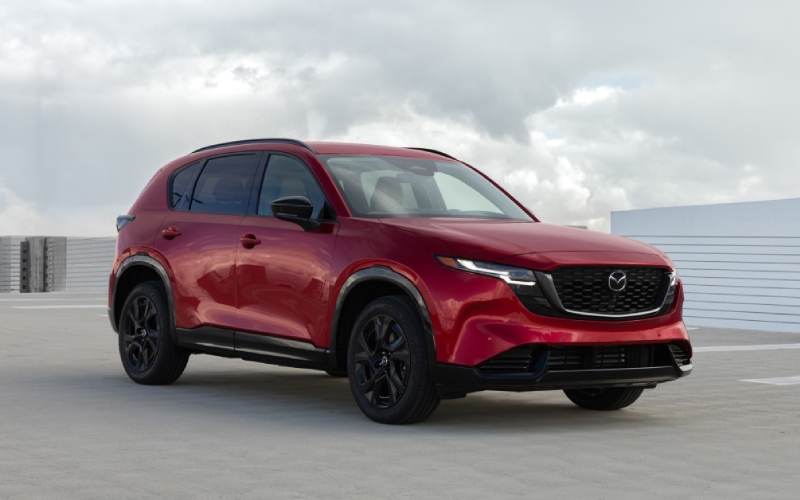
Huntington Beach Mazda - How Google built-in on the 2026 Mazda CX-5 streamlines daily drives around Irvine, CA
The 2026 Mazda CX-5 takes a big step forward in cabin technology with an available 15.6-inch integrated touchscreen and Google built-in. For drivers navigating the 405, the 55, or the quick zigs from campus to coffee around Irvine, CA, that combination can simplify everything from route planning to everyday errands. Instead of juggling phone mounts or bouncing between apps, you get a native, driver-friendly interface that feels coherent the second you sit down. Sign in to your Google Account in the car and your saved places, recent searches, and preferences meet you where you are, so finding the best route to a meeting or your favorite trailhead is as quick as a tap or a natural voice request.
The promise here is reduction in cognitive load. While the 2026 Mazda CX-5 is engaging to drive, its tech is designed to fade into the background until you need it. Google Maps brings fresh traffic and place information right to the center display, and Google Play offers a curated selection of compatible apps that integrate cleanly with the system. This keeps the interface tidy, responsive, and relevant—no patchwork workarounds required. And with natural-voice interactions—plus Google Gemini coming soon to vehicles with Google built-in—you’re positioned for a seamless, hands-free way to ask nuanced questions or chain follow-ups when you need directions, calendar updates, or a quick pit stop recommendation.
What does that mean for real-life driving around Irvine? If you’re heading from a morning class or office drop-off to a meeting along MacArthur or a client visit near the Spectrum, Google Maps in the CX-5 can re-route dynamically as traffic shifts. If a coffee break is in order, just say where you want to stop and let the system handle the details. Pair that with the CX-5’s standard i-Activ AWD® and recalibrated Skyactiv-G 2.5-liter engine, and you get a capable SUV that’s as composed in motion as it is organized behind the glass. The more you use it, the more the interface feels tailored to you—like a well-organized desk that makes it easier to think.
There’s also a productivity side. With a home screen you can customize, your most-used tiles are always within reach. If you split your week between on-site visits and remote work, pin navigation, calls, and your go-to audio sources for quick access. Because the screen is expansive, the system can present the right information without crowding—directions when they matter, glanceable controls when they don’t. The result is a cabin experience that doesn’t ask you to compromise between clarity and control.
Importantly, the tech is part of a larger whole. The 2026 Mazda CX-5’s cabin was rethought around serenity: larger door openings for easy ingress, increased rear-room comfort, and seven-color ambient lighting to set a calm tone. That context matters because the most powerful infotainment is the one you don’t need to wrestle with. The physical layout and the software work together to keep you focused on the road while staying connected to what matters.
Want a few quick tips to get the most from Google built-in on the 2026 Mazda CX-5?
- Sign in first: Log into your Google Account in the vehicle to sync saved places and preferences for a more personalized experience.
- Curate the home screen: Arrange tiles for the apps you use most—navigation, calls, audio—so essentials live one tap away.
- Use natural voice: Skip memorized commands. Ask conversational questions and follow-ups to refine routes or search results.
- Explore compatible apps: Browse Google Play for in-vehicle apps that fit your routine, from news briefings to audio services.
- Keep it current: Check for updates so new features and improvements arrive as they’re released.
Frequently Asked Questions:
Do I need my phone to use Google Maps in the 2026 Mazda CX-5?
No. With Google built-in, Google Maps runs natively on the vehicle’s available 15.6-inch display. Signing in to your Google Account brings over saved places and preferences.
Can I still use my favorite audio apps?
Yes. Many popular services have compatible versions in Google Play for in-vehicle use, giving you an integrated experience with responsive controls on the large display.
What’s the benefit of natural-voice requests?
It lets you ask for what you need the way you talk. You can refine with follow-up questions, so tasks like route tweaks or nearby searches feel fluid and quick.
Does the system get new features over time?
Yes. Because the platform supports updates and compatible app additions, you can benefit from enhancements as they become available.
How does Google built-in complement Mazda’s driver focus?
By making common tasks simple and consistent, the interface helps you stay attentive and calm. It supports, rather than distracts from, the CX-5’s engaging drive feel.
If you’re considering whether this tech is worth it, take a focused test drive and interact with the display the way you would on a normal day—searching for a destination, queuing music, and making a call. That’s the best way to feel how well the 2026 Mazda CX-5’s interface anticipates what you want to do next. Huntington Beach Mazda can walk you through setup tips and show you how to personalize the home screen so your driving day feels streamlined from the start.
For shoppers across Orange County—serving Anaheim, Long Beach, and Irvine—the refinement here is more than a checklist item. It’s a re-think of how screen size, software, and layout can make drives simpler across local freeways and city streets. The 2026 Mazda CX-5’s available 15.6-inch display with Google built-in is a quiet, confident upgrade that pays off every time you press the start button.