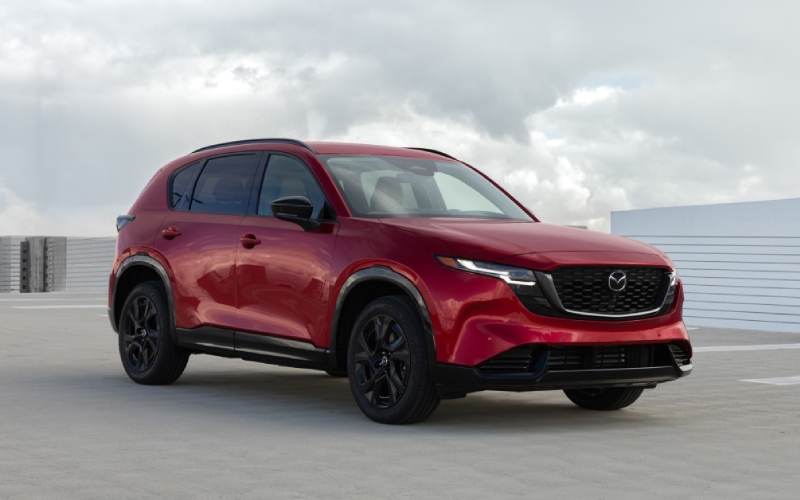
Huntington Beach Mazda - How does the 2026 Mazda CX-5’s Google built-in help everyday driving around Costa Mesa, CA?
The latest CX-5 pairs Mazda’s driver-focused design with a modern, integrated software experience that makes daily driving simpler and more connected. If you often split time between Costa Mesa’s surface streets and quick freeway jumps, the available 15.6-inch touchscreen with Google built-in streamlines how you navigate, communicate, and stay entertained—without juggling your phone.
Let’s look at what that actually means day to day, where clarity, speed, and easy access matter more than specs on a page.
With Google built-in, Google Maps is the native navigation on your display. That means fresh traffic and place information, automatic rerouting, and fast searches that feel familiar. Sign in with your Google Account from the car and your saved places—like a favorite coffee stop by the harbor or a client’s office near South Coast Metro—are right there. No extra steps. The interface itself is customizable, so you can keep your most-used apps and controls just a tap away. It feels less like “learning a new system” and more like using the services you already rely on, just packaged for the road.
Voice is another advantage. You can speak naturally to find a destination, queue up a playlist, or adjust settings. And with Google Gemini coming soon to cars with Google built-in, the system is designed to handle more complex, conversational requests. That means fewer menu dives and more time focusing on the drive—especially useful when you’re navigating busy intersections or changing lanes through the 55/405 interchange.
Entertainment and information are just as approachable. From the Google Play Store, you can access a curated selection of in-vehicle compatible apps—music, news, and more—so your content follows you into the car. This continuity keeps the experience consistent, reducing friction as you shift between work and personal errands throughout the day.
All of this tech lives inside a cabin that’s purposefully calm and uncluttered. Mazda’s approach keeps controls clear and the display well-integrated, instead of feeling like a bolt-on tablet. That matters when you’re driving across town: fewer reflections, clean organization, and swift responses make the interface a tool that supports you rather than demanding constant attention.
Now, how should a Costa Mesa driver test this system to see if it’s worth it? Try this simple flow on your test drive to get a real feel for how it fits into your routine.
- Sign in and set up: Add your Google Account in the car and customize the home screen so your most-used apps and map view are one tap away.
- Search your staples: Use Google Maps to pull up your go-to coffee shop or gym; confirm saved places populate quickly and directions update with traffic.
- Try voice for variety: Ask for a different route, shuffle a specific playlist, or find nearby parking without touching the screen.
- Explore app options: Browse the Google Play Store for compatible audio and news apps you already enjoy to see how they run in-vehicle.
- Evaluate focus: Pay attention to how much you can do without looking away from the road, and how quickly the system responds to taps and voice.
Completing those steps will show you how seamlessly the system meshes with everyday life—no theory, just practical use during a familiar drive.
Of course, the 2026 CX-5’s tech story is anchored by the rest of the vehicle. Standard i-Activ AWD underpins steady, predictable handling, while the longer wheelbase and wider stance contribute to a quieter, more settled ride. Larger door openings and expanded rear leg, knee, and headroom add comfort for friends or family, and the lower cargo lift-in height turns grocery and gear loading into a one-motion task. It’s the combination—driver-first dynamics with modern in-car software—that helps this CX-5 feel right at home for Costa Mesa routines.
If you’re curious how the available 15.6-inch touchscreen compares to your current setup, visit us for a dedicated demo. We can walk you through setup, create a realistic test-drive route, and show you how to make the most of the interface from day one. Our team at Huntington Beach Mazda is committed to making technology approachable and useful, so you can get the benefits immediately, not after weeks of trial and error.
We’re proud to be serving Cypress, Costa Mesa, and Anaheim with an approach that emphasizes clarity, comfort, and confidence. When software and hardware align this well, the result is a vehicle that not only drives beautifully but also simplifies how you manage the details of every trip.
Frequently Asked Questions:
Do I need a data plan or special phone to use Google built-in?
The system is integrated into the vehicle. You can sign in to your Google Account in the car, and certain connected features rely on a data connection. Your phone isn’t required for core navigation or app access, but signing in enables personalization like saved places.
Can I still use my smartphone if I prefer it sometimes?
Yes. While Google built-in runs natively on the vehicle’s display, you can still connect and use your phone when you want. Think of it as having two options—native services for day-to-day ease and smartphone connectivity when you prefer specific apps or habits.
What makes the 15.6-inch display easier to use than a smaller screen?
Size alone isn’t the whole story—it’s the combination of a larger, high-resolution canvas with clean organization and fast responses. Bigger touch targets, a customizable layout, and native Google services reduce friction and help you keep attention on the road.
How does voice control help in busy traffic?
Natural voice lets you request a new destination, refine a route, or change music without taking your eyes off the road. It’s particularly helpful for quick adjustments when merging or navigating multi-lane corridors around Costa Mesa.